

Atmosphere Subsystem#
Aviary has several built-in atmosphere models that support the Aerodynamics calculations, by providing temperature, pressure, speed of sound, and viscosity based on an input altitude. There are two different atmosphere models implemented in Aviary, one coming from the 1976 standard atmosphere tables and the other coming from the publically released MIL-SPEC-210A tables. The standard 1976 tables are the default option and represent the typical conditions experienced at a given altitude. However, it is important to note that “the atmosphere has never, and will never be, standard”. All of the atmosphere models are approximations. The MIL-SPEC-210A tables represent extreme atmospheres in tropical, arctic (polar winter), extreme hot, and extreme cold climates.
To select the atmosphere type, you can use options.set_val(Settings.ATMOSPHERE_MODEL, val=AtmosphereModel.STANDARD)
Comparison between Different Models#
A few graphs comparing the different models have been included so the user can visually understand the different atmosphere models.
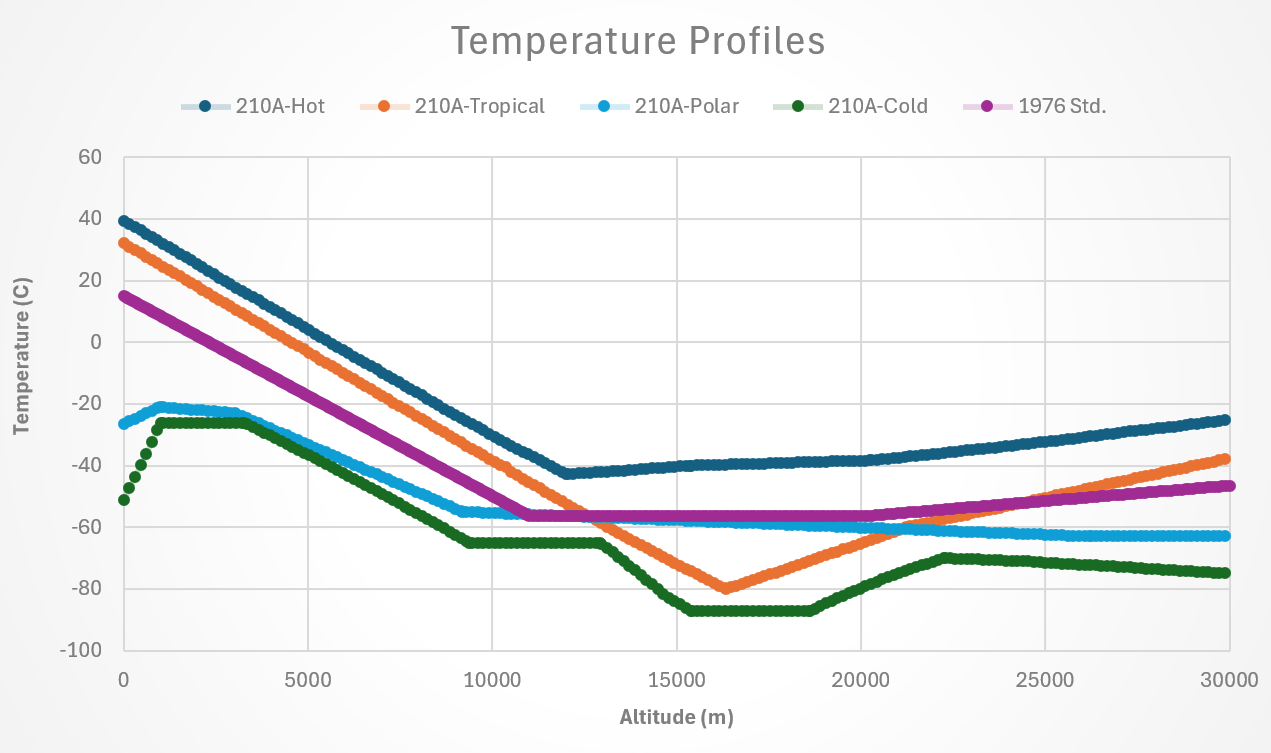
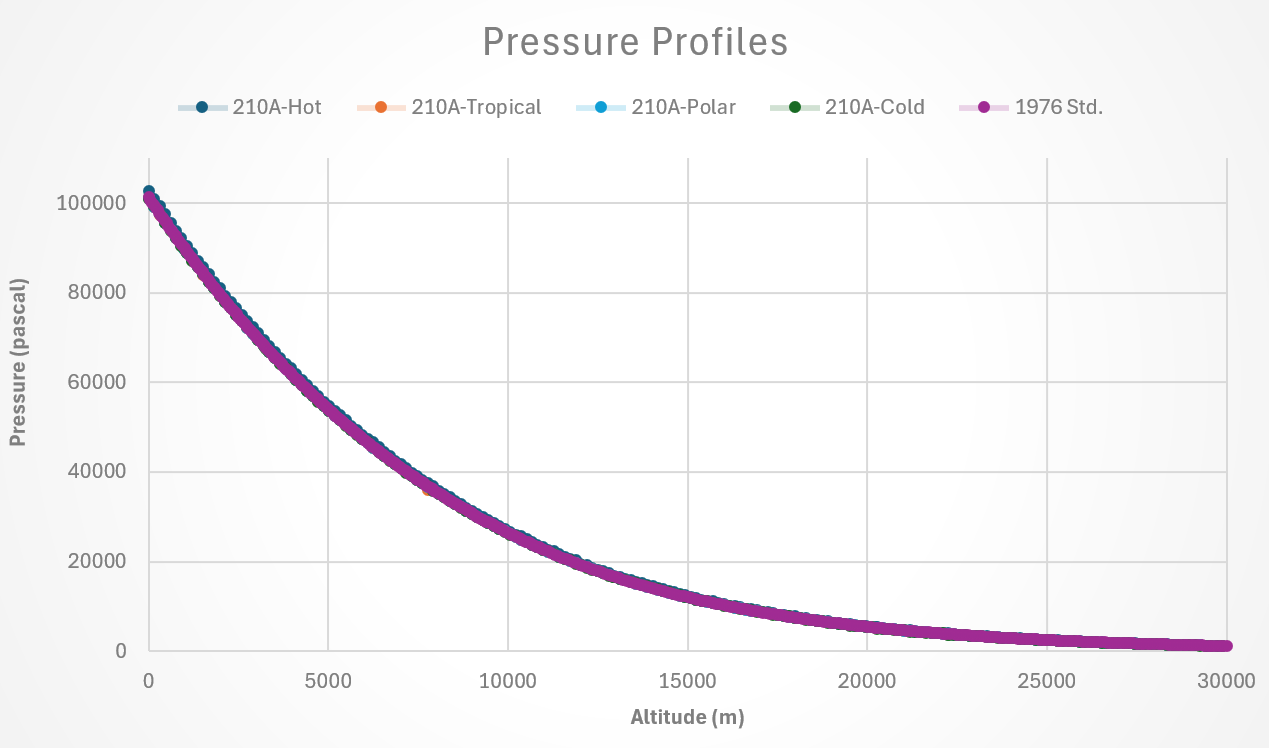
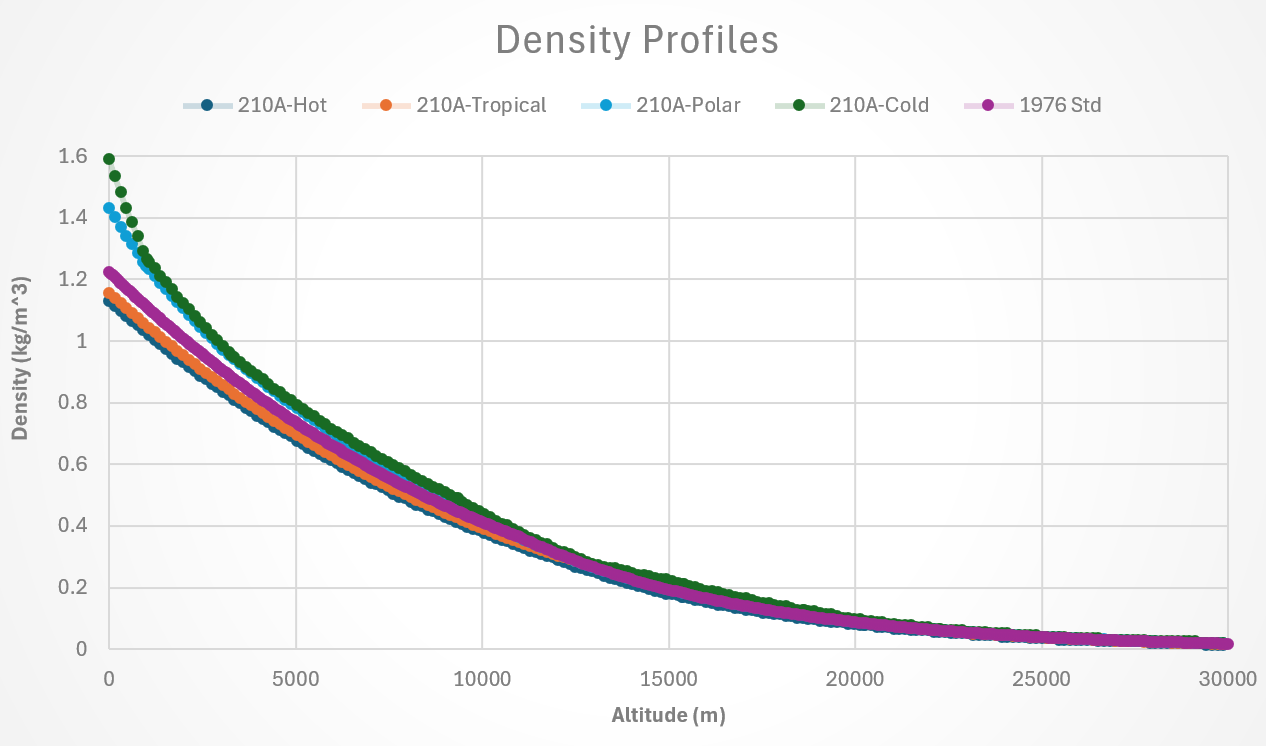
How the Atmosphere Model Works#
Examining atmosphereComp.py will show the code on how the atmosphere component is implemented. Generally speaking, akima splines that represent the raw data are loaded into the model during initialization. The akima splines are used to enhances computational speed. During every subsequent call to the atmosphere mode, an input altitude is translated via the akima splines into a temperature, pressure, density and then additional calculations are performed to determine speed of sound, and dynamic viscosity. The raw data and the akima splines of that data are contained in individual files (StandardAtm1976.py, MIL_SPEC_210A_cold.py, MIL_SPEC_210A_hot.py, MIL_SPEC_210A_polar.py, MIL_SPEC_210A_tropical.py).
User options reference for AtmosphereComp and AtmosphereGroup#
There are some critical options you can pass to atmosphere that you should know about. These options will allow you to change which source data you use, swap between geocentric or geodetic altitude inputs, and add a temperature offset. Changing the source data swaps the akima splines used to calculate temperature, pressure, and density as a function of altitude.
All the options and their defaults and functions are shown below.
om.show_options_table('aviary.subsystems.atmosphere.atmosphere.AtmosphereComp')
| Option | Default | Acceptable Values | Acceptable Types | Description |
|---|---|---|---|---|
| always_opt | False | [True, False] | ['bool'] | If True, force nonlinear operations on this component to be included in the optimization loop even if this component is not relevant to the design variables and responses. |
| default_shape | (1,) | N/A | ['tuple'] | Default shape for variables that do not set val to a non-scalar value or set shape, shape_by_conn, copy_shape, or compute_shape. Default is (1,). |
| delta_T_Celcius | 0.0 | N/A | ['float', 'int'] | Temperature delta from International Standard Atmosphere (ISA) standard day conditions (degrees Celcius) |
| derivs_method | N/A | ['jax', 'cs', 'fd', None] | N/A | The method to use for computing derivatives |
| distributed | False | [True, False] | ['bool'] | If True, set all variables in this component as distributed across multiple processes |
| h_def | geopotential | ['geopotential', 'geodetic'] | N/A | The definition of altitude provided as input to the component. If "geodetic",it will be converted to geopotential based on Equation 19 in the original standard. |
| num_nodes | **Required** | N/A | ['int'] | Number of nodes to be evaluated in the RHS |
| run_root_only | False | [True, False] | ['bool'] | If True, call compute, compute_partials, linearize, apply_linear, apply_nonlinear, solve_linear, solve_nonlinear, and compute_jacvec_product only on rank 0 and broadcast the results to the other ranks. |
| settings:atmosphere_model | AtmosphereModel.STANDARD | N/A | ['AtmosphereModel'] | The atmospheric model used. Chose one of: standard, tropical, polar, hot, cold. |
| use_jit | True | [True, False] | ['bool'] | If True, attempt to use jit on compute_primal, assuming jax or some other AD package capable of jitting is active. |
Temperature Offset Options#
Adding a temperature offset can enable simulation with especially hot or cold days which is useful in acoustic certification of aircraft. When inputting a temperature offset as an option, the temperature throughout the entire altitude regime is shifted up or down by this ammount. The pressure is assumed to remain constant. This is a simplification we must adhere to because we do not have any additional pressure data or assumptions to build upon. Density is then recalculated as an offset from the source data. This is important because that source data may differ from the ideal gas equations used to calculate density. This is the case for the MIL-SPEC-210A data.
US 1976 Atmosphere Notes#
The US 1976 atmospheres source information and notes are as follows:
from aviary.subsystems.atmosphere.data.StandardAtm1976 import DATA_ORIGIN_NOTE

print(DATA_ORIGIN_NOTE)
    United States standard atmosphere 1976 tables, data
    Based on the original model documented in https://www.ngdc.noaa.gov/stp/space-weather/online-publications/miscellaneous/us-standard-atmosphere-1976/us-standard-atmosphere_st76-1562_noaa.pdf
    based on NASA-TM-X-74335.

    Notes:
    The data table contains data from -5,000 meters to 83,000 meters altitude
MIL-SPEC-210A Atmosphere Notes#
The MIL-SPEC-210A atmospheres (including hot/cold/tropical/polar) source information and notes are as follows:
from aviary.subsystems.atmosphere.data.MIL_SPEC_210A_Tropical import DATA_ORIGIN_NOTE

print(DATA_ORIGIN_NOTE)
This information applies to MIL_SPEC_201A_tropical, MIL_SPEC_201A_polar, MIL_SPEC_201A_cold,
and MIL_SPEC_201A_hot

Source:
Data for the models was obtained from ASC-TR-93-5002 / AD-A264 639,
Graphical Comparison of U.S. Standard Atmospheres and Military Standard Climatic Extremes
by Joseph C. Zuppardo, February 1993
Approved for public release with unlimited distribution
https://apps.dtic.mil/sti/tr/pdf/ADA264639.pdf

Notes:
1) The data table contains data from 0 feet to 100,000 ft =~ 30,000 meters altitude
2) The composition of the atmosphere is constant throughout the altitude range.
3) Polar data represents an Arctic Winter atmosphere rather than a true polar atmosphere
4) Altitude was given in the raw data as Geopotential Altitude
5) Some data points in the original tables appeared to be in error.
i.e. for hot atmosphere at 20,000 ft pressure increased so much as to be the same as pressure
at 11,500 ft. Presumed errors like these were smoothed out to prevent kinks in the akima
splines.
6) Using the ideal gas equations to recalculate Density will yield
different results than the table.
7) Hot/Cold vs. Tropical/Polar have different sea level pressures (29.9 vs. 29.92 respectively),
despite the description by the paper that Hot/Cold are at 29.9. This can be verified by
looking directly at the tabular data presented in the paper.
8) The inHG measurement shown in the tables is assumed to be taken at 60 degF = 15C,
(as opposed to 32F = 0C). Supporting documentation for this is based on NIST and the US1976
atmosphere standard which lists sea-level pressure of 101,325 Pa, based on the NIST conversion
factors to translate Pa to inHG at 60F, these match up. inHg has a dependence on temperature
which makes it a very temperamental unit and should be avoided in the future.
https://physics.nist.gov/cgi-bin/cuu/Value?stdatm
https://www.ngdc.noaa.gov/stp/space-weather/online-publications/miscellaneous/us-standard-atmosphere-1976/us-standard-atmosphere_st76-1562_noaa.pdf
9) "The cold and hot atmosphere tables cannot be used for determining
engine and aircraft performance, aerodynamic characteristics, skin, compartment
and equipment temperatures under transient climb conditions" - Mil_Std_210A
10) "The polar and tropical atmospheres provide criteria for consideration in problems
dependent upon a hydrodynamically consistent homogeneous polar or tropical atmosphere.
These problems include determination of engine and aircraft performance,
aerodynamic characteristics, skin, compartment and equipment temperatures
under transient climb conditions," - Mil_Std_210A
Adding your own Atmosphere Model#
If you desire to add your own atmosphere model you can do this one of two ways. Either create a new AtmosphereComp.py from scratch, or by importing a new set of raw data and using the current atmosphereComp.py to read it in and process it. This will include first saving your new raw data set in a new file and then creating a new set of akima splines for that data and also saving them in the same file. After that, utils/build_akima_coefs.py can read in the akima’s and run as normal. This walkthrough will help you perform the latter option. Start by creating a new file to hold your raw atmosphere model and the eventual akima splines.
Create a new Atmosphere file#
You will need to make a new file to hold the raw data of your atmosphere model and the akima splines. This file should be titled after your atmosphere model, i.e. StandardAtm1976 or MIL_SPEC_210A_Cold.
Save that file inside of the aviary/subsystems/atmosphere/data folder.
You will need to make a new _raw_data dictionary inside your new file. Look at the example _raw_data contained in data/StandardAtm1976 for reference.
Converting Raw data Proper Units#
From here on our we need to be especially mindful of units. We are going to use a utility function build_akima_coefs to help create the akima coefficients. The helper function is located in utils/build_akima_coefs.py.
We only need to build the akima coefficients once and we do it so that the atmosphere model is very fast. The atmosphere model will need the following information: (Altitude, Temperature, Pressure, Density). If you don’t have one of those values that’s ok, typically given Altitude, Temperature, and some assumption of the pressure at sea level, all other values can be calculated based on ideal gas assumptions.
Your units inside of _raw_data should be one of the following:
English: [altitude (ft, ), temperature (degF), pressure (inHg at 60degF), density (lbm/ft**3)]
Altitude can be in either in geodetic or deocentric
Pressure will only translate properly if given in inHg at 60degF. However, many data sets use inHg at 30degF.
SI Units: [altitude (m), temperature (degK), pressure (millibar), density (kg/m^3)] Altitude can be in either in geodetic or deocentric
If your units do not match either English or SI as designated above, you will need to modify the build_akima_coefs function to properly translate your raw data into SI units. (All calculations inside of atmosphere.py are happening in SI units with SI akima splines)
Processing new Akima Splines#
Next, open up utils/build_akima_coefs.py, you will notice that at the bottom of the file there is an call to if __name__ == '__main__':. Change the import location to point to your new _raw_data file and change the units to be either SI or English, depending on your raw data. Then execute python atmosphereComp.py, this will call the build_akima_coefs to build the akima splines using your raw data. Copy those splines into your new atmosphere file you made a few steps earlier and save the file.
Add the new data to Enums#
You also need to add your new atmosphere model to the Enums so that it shows up automatically for ease of use:
Head over to aviary.variable_info.enums.py and modify the class AtmosphereModel(Enum): to add your new atmosphere model name.
Import the Processed Data#
Next we will need to import these akima splines into AtmosphereComp() i.e.
from aviary.subsystems.atmosphere.data.NEW_DATA_FILE import atm_data as new_data
Lastly in Setup() section of AtmosphereComp() there is a section of code that loads the atmosphere model based on the user specified option. Add a new line there to properly load youre new file:
elif self.options[Settings.ATMOSPHERE_MODEL] is AtmosphereModel.'new_name': self.source_data = new_data
Test Your Model#
Now that you have your model loaded and ready to go, use the manual test at the bottom of utils/build_akima_coefs.py to test inputting a few altitude values into your model and inspect the resulting output of temperature, pressure, density, speed of sound, and dynamic viscosity.